Autoware-Compatible Map Authoring
Turn one compatible rosbag2 into a verified map bundle that can be reviewed before it is loaded by Autoware-compatible tooling.
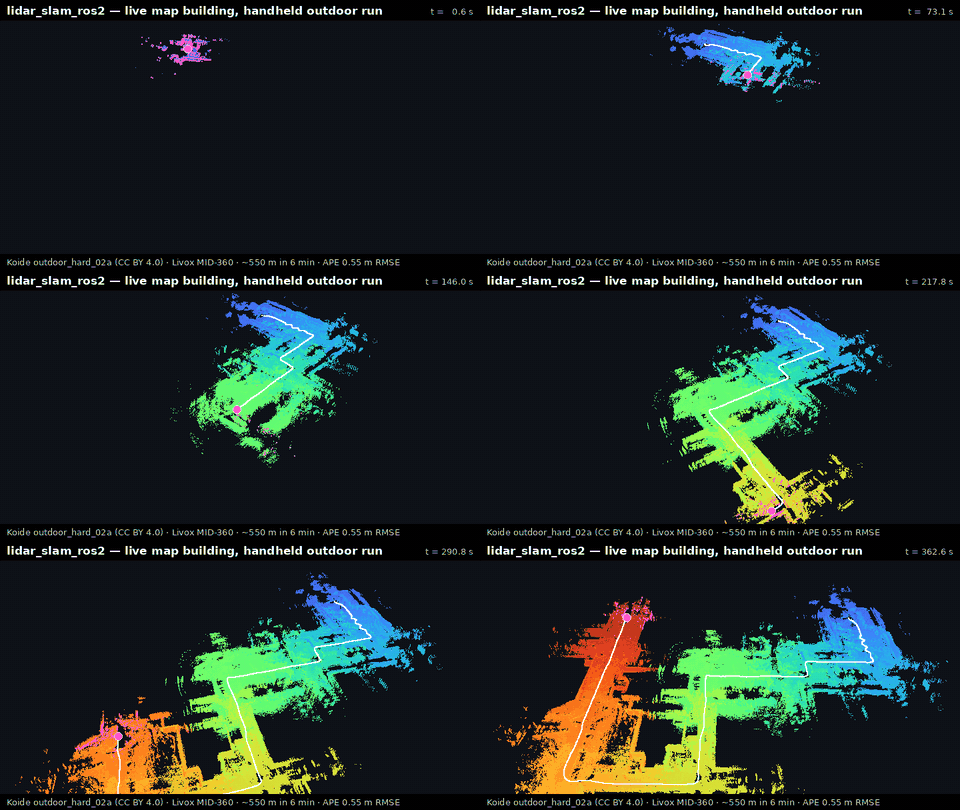
The maintained product path uses the RKO-LIO frontend and
graph_based_slam backend. It writes pointcloud_map/ plus
map_projector_info.yaml; verification remains separate from viewing so a
viewer problem cannot change the map result.
Choose One First Step
| Your starting point | First step |
|---|---|
| Docker only; try the published stable demo | Run Docker First Map below |
| Source build installed | lidarslam-map doctor, then lidarslam-map demo |
| Your own compatible rosbag2 | lidarslam-map doctor /path/to/rosbag2, then lidarslam-map start /path/to/rosbag2 |
| Not installed yet | Follow Build + verified demo from source |
If you are unsure, run lidarslam-map with no arguments in an interactive
terminal. It offers only the installation check, fixed demo, own-bag mapping,
and previous sessions, and shows the delegated command before doing work.
Try The Published Stable Demo
No ROS 2 workspace is required:
mkdir -p "$PWD/lidarslam_output"
docker run --rm \
  -e LIDARSLAM_HOST_UID="$(id -u)" \
  -e LIDARSLAM_HOST_GID="$(id -g)" \
  -v "$PWD/lidarslam_output:/lidarslam_ws/output" \
  ghcr.io/rsasaki0109/lidar_slam_ros2:v0.10.0-humble
This route is pinned to the published v0.10.0-humble image and writes the
verified demo to lidarslam_output/mid360_demo/. Jazzy users can select the
published v0.10.0-jazzy image. See Getting Started for
platform notes and the source route.
Map Your Own Bag
First inspect the installation and bag without starting a map:
doctor checks topics, point fields, timestamp order, and maintained profile
compatibility. It writes no output and gives a concrete next action when the
bag is not ready.
When the review passes, use the human workflow:
start keeps the detected topics, frames, profile, calibration, and exact
command visible before writing. It then runs the map lifecycle, verifies the
saved bundle, records diagnosis evidence, and opens the offline session page.
Use --yes only after that setup has already been reviewed for a
non-interactive launcher.
Adapting another PointCloud2 LiDAR
Do not begin by forking lidarslam.launch.py or editing a tracked parameter
file. For a bag recorded from Ouster, Velodyne, RoboSense, a simulator, or
another PointCloud2 publisher, use the same two commands above. doctor
inspects the recorded topic type, header.frame_id, point fields, timestamp
order, and available maintained profiles. start preserves that selection and
requires calibration review before it writes or launches mapping.
If the input layout or sensor combination has no safe maintained path, the command exits before mapping with a stable reason code and one copy-ready next action. This route prevents guessed remaps and transforms; it does not turn a detected PointCloud2 topic into verified hardware support or an accuracy claim.
For Docker without a ROS installation, follow
Docker Own-Bag Map. Its launcher checks
that the selected image supports this same start contract before creating an
output directory. The published v0.10.0 images carry that contract; the older
v0.9.0 images predate it and are rejected.
What Success Looks Like
A successful session reports verification PASS and keeps the result and its
evidence together. The bundle includes:
session.htmlandsession.json, the offline landing page and its status;pointcloud_map/andpointcloud_map_metadata.yaml;map_projector_info.yaml;run_manifest.jsonandverify_autoware_map.log;autoware_map_diagnosis.jsonand.md;first_map_validation_receipt.jsonand.md;lanelet2_map.osmwhen lanelet generation is enabled and succeeds.
Generated lanelets are a starting point for authoring, not surveyed road
semantics. Review them before use. A bundle without verification PASS is not
a validated point-cloud map.
Return, Compare, And Ask For Help
lidarslam-map sessions
lidarslam-map view "$PWD/output/my_map"
lidarslam-map compare /path/to/day1 /path/to/day2
lidarslam-map support /path/to/session_bundle
sessions reopens retained work. compare reports recorded differences
without inventing a score or winner. support creates a privacy-bounded ZIP
for human review; it does not upload anything. After a verified first map,
lidarslam-map report /path/to/session_bundle prints the
read-only independent-validation handoff.
When filing an Autoware map issue, report the projector type and whether an
origin exists, but replace all latitude, longitude, altitude, MGRS/grid, and
precise origin values with REDACTED. Attach only the reviewed support ZIP or
non-geometry verifier findings—not the map bundle, pointcloud/lanelet files,
rosbag, raw private logs, or screenshots revealing a private place.
The Run Finished, But The Map Looks Wrong
Keep the session instead of guessing launch/YAML changes. Add exactly one observed symptom to the existing inspector:
lidarslam-map inspect /path/to/session_bundle \
  --bag /path/to/rosbag2 \
  --symptom map-spins-or-spirals
The supported symptom codes are map-spins-or-spirals,
pose-drifts-or-oscillates, map-stops-early, map-is-too-sparse, and
map-is-not-visible. The result orders the sensor, timestamp, calibration,
TF, runtime, map-save, and viewer checks and returns only copy-ready
doctor, inspect, view, or support commands. Add --write to retain the
card beside the run, or --json for local automation.
This is user-reported symptom triage, not automatic root-cause analysis or an
accuracy result. It never edits parameters, restarts mapping, uploads a bundle,
or turns one visual change into a hardware-support claim. Preserve the old run
and use a fresh output for any later comparison. If the card is retained with
--write, support carries only the fixed symptom code and its user-reported
basis into the sanitized report and issue body. Titles, checks, commands, and
free text stay local.
Automation
Use an explicit output directory when a script, CI job, or other automation already owns the setup decision:
Use start for people because its setup and calibration review is part of the
public workflow. Lower-level launch files and repository helpers are advanced
interfaces, not additional beginner routes.
Current Publication Boundary
v0.10.0 is the latest published stable release. Its v0.10.0-humble and
v0.10.0-jazzy images carry the same lidarslam-map contract as the
v0.10.0 source tag. Therefore:
- use the pinned
v0.10.0-humbleorv0.10.0-jazzyimage for the published fixed demo and the Docker own-bag route; - build the
v0.10.0tag, or a reviewed later revision, from source; - do not assume that a moving development image is a stable release.
Advanced Paths
Use Autoware Quickstart for the older NTU VIRAL viewer/dogfood compatibility route, Operator Workflows for direct launches and sensor-specific configuration, and Benchmarking and Release Gate for reproducible evaluation. Those routes do not replace the beginner commands above.
The exact supported inputs, outputs, recovery behavior, and non-goals are in the Product Contract.